
I’ve used Costura.Fody a bunch of times for Encompass plugins. It’s one of those “set it and forget it” utilities. You drop in your FodyWeavers.xml, list out your DLLs, build it, and everything folds neatly into one self-contained plugin file. It’s basically magic.
For anyone who hasn’t had the joy of doing this, here’s how it works.
Encompass ships with two categories of DLLs.
The first is your standard .NET libraries like System, System.Text, System.Net, etc.
The second is the Encompass-specific stuff: EncompassObjects.dll, EncompassAutomation.dll, and all the other custom assemblies the Smart Client downloads to your machine.
You can reference those just by pointing Visual Studio to your local Encompass install directory after logging into the Smart Client. Then, when your plugin is uploaded, it’ll find the references within the Encompass desktop application automatically.
Where things get tricky is with NuGet packages. Anything that’s not part of Encompass or the standard .NET set has to make its way into the Smart Client somehow.
You have two options:
-
Upload the DLLs manually into the Smart Client plugin library. This works, but isn’t the best idea. If you upgrade or downgrade versions in your plugin, you have to always remember to manually upload them to Encompass’s Customization screen.
-
A better option is to fold them directly into your plugin with something like Costura.
Costura bundles those dependencies inside your plugin DLL so you never have to worry about version mismatches or missing assemblies. It keeps things simple and portable. Usually, this takes five minutes at most.
Your FodyWeavers.xml might look like this:
<Weavers xmlns:xsi=”http://www.w3.org/2001/XMLSchema-instance”
         xsi:noNamespaceSchemaLocation=”FodyWeavers.xsd”>
  <Costura IncludeDebugSymbols=”false” CreateTemporaryAssemblies=”false”>
    <IncludeAssemblies>
      Serilog
      Serilog.Sinks.ApplicationInsights
      Microsoft.ApplicationInsights
      SendGrid
    </IncludeAssemblies>
  </Costura>
</Weavers>
You build it, upload it, and Encompass just runs it. Except this time, it didn’t.
The plugin uploaded fine, but then I got greeted with this:
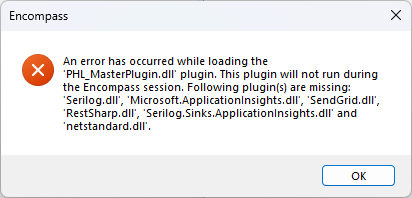
This made no sense. Costura was supposed to handle all of this. The error said every major dependency was missing — Serilog, ApplicationInsights, RestSharp, SendGrid, even netstandard.dll.
That last one was a clue, but I didn’t realize it yet.
The first thing I did was double-check my build. Maybe the DLLs weren’t being folded in. I tried rebuilding, cleaning, repackaging, and even messing with ILRepack. (Spoiler: ILRepack did absolutely nothing.)
Finally, I decided to decompile my dll with DotPeek, and sure enough, my dll’s were all there, compressed.
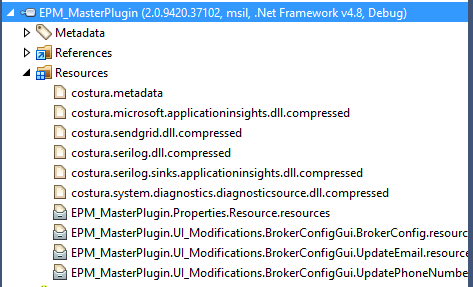
Every single dependency, sitting right there inside the assembly under the Resources section. Folded in the entire time.
So Costura was doing its job. The problem was deeper. Encompass wasn’t seeing it. I tried setting up temporary assemblies, I tried folding everything in, not just the necessary dll’s. I even tried uploading, and that failed as well with some really bizarre errors like System.Text.dll is missing. That didn’t make sense at all.
I eventually created a brand-new barebones plugin from scratch. It uploaded fine. Then I added one reference at a time, building and uploading after each addition. No issues. Then another, and another, still clean. Until I added the ApplicationLogSink.cs file and boom, netstandard.dll error. This file implemented ILogEventSink, which triggered the netstandard fiasco.
The reason I wanted this ApplicationLogSink file was so that I could write to ApplicationInsights and the Encompass local log simultaneously. For JIT debugging locally on a user’s computer during screen share, that local debugging feature is a huge time saver. But alas, it wasn’t in the cards.
That’s when I learned about Encompass’s quiet relationship with netstandard.
Even though Encompass is built on .NET Framework 4.8, referencing modern libraries like Serilog (which targets .NET Standard) drags in netstandard.dll as a bridge between the old and the new worlds. Encompass doesn’t ship with it, so unless you manually include it or let something like Costura handle it perfectly, you’re out of luck.
The problem was that my custom ApplicationLogSink class pulled in enough .NET Standard code to trigger the whole dependency chain. It wasn’t worth the fight.
I swung at Costura for another couple of hours before I finally had to make a decision. I pivoted.
Instead of keeping the fancy sink setup, I wrote a simple CustomLogger class that just passed logs to both Encompass’s ApplicationLog and Application Insights. No magic, no reflection, no guessing what would load. Just code that worked.
Was it elegant? Not really. But it kept the plugin running and got me out of DLL hell.
And after all that, the real lesson?
Sometimes the five-minute task that used to just work becomes your week-long debugging saga, and that’s fine. Because when the smoke clears, you end up understanding your tools ten times better, or at least you know when to stop fighting the build gods.